GDG Coding Jams
Build with AI. Together.
Share
← Back to the jams
Track 05

Mood Jar

Type how you're feeling → a little token drops into your jar.

✅ Drop-in friendly2-hour jamShips in 45 min
🫙
The demo

What it looks like when it’s working

In the room · 45 minutes

What you’ll build

One text box: type what's on your mind. AI generates a mood sticker/item — kawaii emoji, glowing orb, tiny potion, pixel-art object — and drops it into a visual 'jar' on the page. The jar fills up as you keep writing.

The moment it clicks

My scattered thoughts just turned into a cute little token in my jar.

Things to think about

While you build

  • The visual aesthetic of the tokens IS the soul of the app. Kawaii emojis, glowing orbs, tiny potions, pixel-art objects — pick a vibe and stay there.
  • The jar is a simple container today. No physics, no falling animations, no settling — that's the polished version. Items just appear inside.
  • No persistence across sessions. The 'jar that fills over weeks' is the magical polished version — leave it as a reason to come back.
  • One token per submission. Don't generate a grid of options. The serendipity of one is part of the feel.
The 2-hour Jam rhythm

How the night flows

Every Coding Jam follows the same five-phase shape. Talking is short, building is long.

  1. 0:00 – 0:15
    Intro

    Grab a name tag and a slice, say hello to the instructor, and meet the people either side of you — you'll be asking them things later, so it pays to know their names now. Low pressure, high creativity, ship something messy. Then a quick word on what the room is building tonight, and you're off.

  2. 0:15 – 0:30
    Credits & setup

    The instructor shares the Google Cloud credits with the room. Everyone gets their environment ready — whichever tool they brought. Nobody should be installing anything once the build starts.

  3. 0:30 – 1:35
    Build

    Heads down, and enjoy it — this is the part everyone came for. The agent does the typing; you decide what it's making. Ask the room when you get stuck; someone two seats away hit the same wall ten minutes ago. Want more structure? The codelab walks the spec-driven route — Setup → Plan → Review → Build → API → Verify — but nobody has to follow it.

  4. 1:35 – 2:00
    Share & submit

    Show the room what you made — two minutes, screen-shared from your seat. Half-finished is welcome; the wobbly ones are usually the most interesting. Say what surprised you along the way, and cheer for everyone else while you're at it. Then submit your build before you leave. This is the one thing not to skip — it's what puts your name and your chapter on the showcase, and it takes about two minutes.

Polished version pulls in

Where to take it after the jam

The 45-minute build is the win in the room. These are the ideas you can pull in over the next week — your homework isn’t homework, it’s the polished version.

  • Local storage so the jar persists
  • Animated physics (tokens settle, jar tilts)
  • Multi-day pattern detection
  • Cross-device sync
  • Mood history charts
  • Share-your-jar mode
  • Voice memo input
If you get stuck

Open one of these in the starter — safety nets, not requirements.

  • context/persona-prompt-pattern.md
From the community

Builds shipped from this track

All builds from this track →
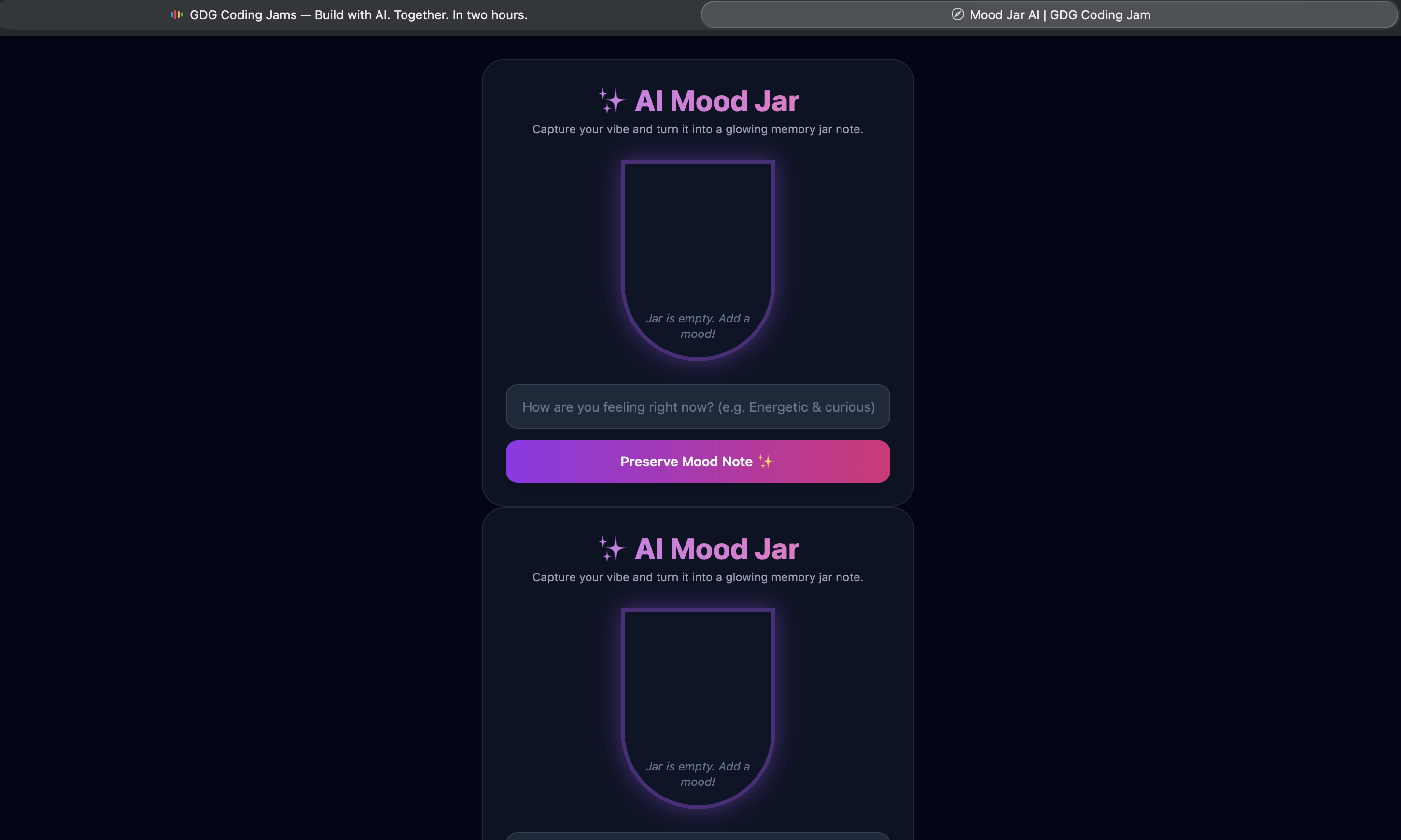
Mood Jar AI
Track 05Solo — New York, NY
Mood Jar AI

An interactive digital mood jar app that transforms daily emotions into preserved, glowing memory notes. Users record their current state of mind to receive instant AI reflections, visual vibe tracking, and mood history visualization directly in the browser.

I was surprised by how a simple visual UI transformation and lightweight client-side state could instantly make emotion-tracking feel so tactile, playful, and engaging.

Pick another track

All independent — start anywhere.

See all jams →