Run a Coding Jam in your city.
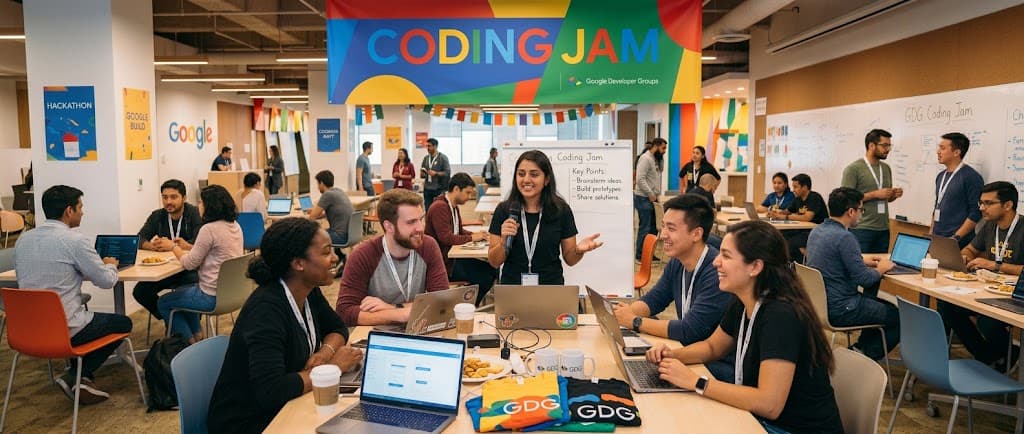
Hosting a Coding Jam is one of the best ways to connect the builders in your community — a room of developers leaves with a working app, a new collaborator, and someone to text the next time they get stuck. Bring the room; the kit brings the rest. From planning to execution in 2 weeks.
Publishing a jam page needs a spot on the organizer roster. Not on it yet? Ask above — it takes one email.
Get every build submitted before people leave.
Two minutes per person, in the room. Once everyone walks out, it never happens.
A pre-flight checklist.
Link the right checklist in your event description. Setup otherwise eats half the session. Drop-ins without it are still welcome — pair them with a TA.
- T-48hPin the checklist in the RSVP email
- T-2hRe-share it
- DoorsUndecided? Send them to the tool picker
Antigravity, Git and a Gemini API key — plus uv, Node and disk-space extras. For anyone bringing a laptop they already code on.
See the checklist →A browser and a Google account. For everyone who'd rather not install anything — which is a preference, not a limitation.
See the checklist →Your job, not theirs. Recommended when running an official GDG event — Google Cloud credits cover API spend and tie to the chapter KPI. Note they only apply to the Antigravity path, which bills through a Cloud project; anyone on AI Studio uses its free tier and needs nothing from you. Skip this entirely for casual jams.
Ask na-developer-communities@google.com for credits. Send a date, a headcount and your GCP project ID.
Present, then submit.
Rooms reliably do the first and forget the second. Put both on the schedule.
Get people presenting
Three volunteers. Two minutes each. From their seat.
- Ask at the halfway mark, not the end
- Pick a half-broken one on purpose
- Ask each one: what surprised you?
Then everyone submits
Not just the presenters. In the room, before anyone packs up.
- Put the submit link on the projector
- Say out loud that half-finished is fine
- Screenshot required; repo and demo optional
Two hours. Four movements.
We keep the talking short and the building long. Organizers facilitate; the room creates. This shape repeats across every track — it's the muscle memory.
Most of the two hours is Build, and it's deliberately loose — the agent does the typing, participants decide what it's making. The codelab is there for anyone who wants a structured route through it, not a script the room has to follow.
Pre-warm the deploy target by pushing a hello-world before doors open. The first deploy of the night is usually the slowest.
Your demo is your most important deliverable. Practice it once on the morning of, with the actual production stack you'll use on stage.
- 0:00 – 0:15Intro
Grab a name tag and a slice, say hello to the instructor, and meet the people either side of you — you'll be asking them things later, so it pays to know their names now. Low pressure, high creativity, ship something messy. Then a quick word on what the room is building tonight, and you're off.
- 0:15 – 0:30Credits & setup
The instructor shares the Google Cloud credits with the room. Everyone gets their environment ready — whichever tool they brought. Nobody should be installing anything once the build starts.
- 0:30 – 1:35Build
Heads down, and enjoy it — this is the part everyone came for. The agent does the typing; you decide what it's making. Ask the room when you get stuck; someone two seats away hit the same wall ten minutes ago. Want more structure? The codelab walks the spec-driven route — Setup → Plan → Review → Build → API → Verify — but nobody has to follow it.
- 1:35 – 2:00Share & submit
Show the room what you made — two minutes, screen-shared from your seat. Half-finished is welcome; the wobbly ones are usually the most interesting. Say what surprised you along the way, and cheer for everyone else while you're at it. Then submit your build before you leave. This is the one thing not to skip — it's what puts your name and your chapter on the showcase, and it takes about two minutes.
- ✓Participants can say in one line what they set out to build
- ✓Someone says 'wait, that's a polished-version feature' mid-build
- ✓Drop-ins are scoping their own build without being walked through it
- ✓At the end, the variations between participants are wide
- !Participants copy the demo verbatim instead of making it theirs
- !Builds keep slipping past 45 minutes because everyone added more features
- !At Compare Notes, every project looks the same
- !Wall of Vibes stays empty halfway through
When you see the latter: pause, get them to say out loud what they are building, and re-read the question this track emphasizes. The reset usually re-anchors the room.
FAQ
Four issues that come up in almost every room. If a participant is stuck for more than 5 minutes, check these first.
Symptom: Gemini API call returns 403 / quota error halfway through Verify.
Fix: During Setup, link the Google Cloud credits to the GCP project at console.cloud.google.com/billing. If you skipped GCP entirely, AI Studio works for free in the browser — send them there instead.
Symptom: App loads but every Gemini call returns 401.
Fix: Open the project root, confirm `.env` exists (NOT `.env.example`), and the key is `GEMINI_API_KEY=...` with no quotes around the value. Restart the dev server after editing.
Symptom: App opens but the agent panel hangs on first prompt.
Fix: Make sure you downloaded the arm64 build, not Intel. Quit the app fully (Cmd-Q, not just close window) and reopen. If still stuck, check Activity Monitor that the process is `Apple` architecture.
Symptom: Participant runs `pip install`, gets ModuleNotFoundError later.
Fix: The codelab uses uv. Direct them to `uv sync` (installs deps from pyproject.toml) and `uv run <command>` (replaces `python <command>`). pip will silently install into the wrong environment.
Got everything you need?
Open a track, grab the kit, and start preparing. Once you've hosted, share what your room shipped on the showcase — it helps other GDGs get started.
What to say, what to watch, what to fish for.
You do not demo anything. Whatever you show becomes the room's default, which turns an open track into a prescribed one. Read the requirement, let people choose, and spend the session watching for the one failure mode each track produces.
💡Build your own ideaBrowser is enoughBuild the idea you have been planning. There is no topic this session.+
Write a one-paragraph description of what you are building before you start.
Read the requirement and give the room ten minutes to write the paragraph before anyone opens a tool.
Scope that cannot be described in three sentences. Ask for the description; the difficulty is the signal.
A build that shipped because the participant cut something. Ask what they cut.
Offer these only when asked, and offer more than one.
- An idea you have described to someone but have not started
- A tool that solves a problem you have
- A version of an application you use
- An idea from an earlier session that you did not finish
🌱AI for GoodBrowser is enoughA multi-chapter regional initiative uniting chapters around annually rotating societal challenges to build solutions with Google's applied AI ecosystem.+
Build an open-source prototype addressing an annually rotating societal challenge (environmental resilience, digital accessibility, public health informatics, or workforce readiness).
Read the 4-pillar 100-point rubric and confirm teams have chosen an annual challenge focus before writing code.
Gimmick AI features without real social impact or neglecting accessibility and license requirements.
A build designed with direct empathy for non-profit operations and measurable community impact.
Offer these only when asked, and offer more than one.
- Environmental Resilience: Carbon footprint tracking or hyper-local disaster response
- Digital Accessibility: Multi-modal screen assistance or WCAG-aligned adaptive UI
- Public Health Informatics: Community resource allocation or triage assistance
- Workforce Readiness: Vocational training simulators or accessible career coaching
📱Build an Android appBrowser is enoughBuild an Android app and install it on your own device. You decide what the app does.+
Your app must run on an Android device or the browser emulator before the session ends.
Read the requirement, then confirm every participant has either a device and a USB cable, or the browser emulator open. Settle device setup before the build block starts.
Participants design the app before they install anything. Ask early who has run an empty app on a device. Anyone who has not should do that first.
Two builds that used different sensors. The contrast shows the room how wide the requirement was.
Offer these only when asked, and offer more than one.
- A tool built around one phone sensor, such as the accelerometer or the light sensor
- A single-screen utility you would use the next day
- A game that responds to movement
- An app that shows one piece of information and nothing else
🗺️Put it on the mapBrowser is enoughBuild an application that uses real map data. You decide what it shows.+
Your application must display a real location on a map and respond to what is there.
Read the requirement and confirm everyone can load a map with a working key. Do not suggest a city or a use case.
Prompts that leave out location data, which return generic results. Ask to see the prompt when someone says the output is bland.
One build that used the map as input and one that used it as output. They read the same requirement in opposite directions.
Offer these only when asked, and offer more than one.
- A quiz about the area around a chosen location
- A walking route with a generated description for each stop
- A comparison of two neighborhoods
- A recommendation based on where the user is
🎮Make it multiplayerBrowser is enoughBuild something two or more people use at the same time. You decide what it is.+
A second person must be able to join from another device and see updates without refreshing.
Read the requirement and ask the room to pair up before the build block starts. Every participant needs a second person to test with.
Participants build the interface before the join flow, then find at the end that nobody can connect. Ask for a working join link by the halfway point.
A build where the second person does something different from the first. Symmetric games are common; asymmetric ones are worth showing.
Offer these only when asked, and offer more than one.
- A two-player board game
- A shared drawing surface
- A quiz the room answers together
- A voting or ranking tool
📊Build with a datasetBrowser is enoughChoose a public dataset and build something with it. You decide what question to ask.+
Your application must use a real dataset. Data you generated does not count.
Read the requirement and give the room five minutes to choose a dataset before anyone writes code.
Participants query the data before they decide the question, then present whatever came back. Ask what question they are answering.
Two builds that used the same dataset and reached different conclusions.
Offer these only when asked, and offer more than one.
- City service requests, such as 311 reports
- Public transit punctuality or traffic history
- Sports results and player statistics
- Search interest over time, by region
- Open city data such as tree inventories or air quality
🎙️Build with the Live APIBrowser is enoughBuild something that responds while the user is still speaking or showing it something. You decide what it responds to.+
Your application must accept live audio or video input and respond during the input, not after it.
Read the requirement and ask everyone to test microphone permissions immediately. Browser permission prompts consume build time.
Responses that run long, which break the sense of a conversation. Suggest a sentence limit in the prompt.
A build that responds while the speaker is still talking, rather than after a pause.
Offer these only when asked, and offer more than one.
- A conversation partner for a language you are learning
- A narrator that describes what the camera sees
- An assistant that extracts action items while people speak
- A hands-free instruction reader for cooking or repair
🤖Build an agentLaptop neededBuild something that chooses which tools to use instead of answering directly. You decide what it works on.+
Your agent must have at least two tools and choose between them at run time.
Read the requirement and ask each participant to name their two tools out loud before they start.
Two tools that do similar things, which produces an agent that only ever calls one. Ask what makes the tools different.
A run where the agent chose a tool the participant did not expect.
Offer these only when asked, and offer more than one.
- An assistant that searches, then summarizes what it found
- An assistant that queries a database and formats a report
- A planner and an executor that pass work between them
- An agent that checks one source before it answers
👀Build with what the camera seesBrowser is enoughBuild something whose main input is an image rather than typed text. You decide what it looks at.+
Your application must take an image or camera input as its primary input.
Read the requirement and ask everyone to take one deliberately poor photograph to test with.
Testing only with clear images. Results degrade sharply on the photographs people actually take.
A build that states when it is uncertain. Most will not, and the contrast is the lesson.
Offer these only when asked, and offer more than one.
- Identify something and explain it
- Translate text that appears in a photo
- Check a physical space against a checklist
- Describe an image for someone who cannot see it
🔍Answer from your own documentsBrowser is enoughBuild something that answers questions from documents you provide. You decide which documents.+
Every answer must cite the passage it came from.
Read the requirement and ask everyone to have their documents on disk before the build block starts.
Time spent on the wording of answers instead of on how documents are split. Retrieval quality decides the result.
A build that correctly refuses to answer something that is not in its documents.
Offer these only when asked, and offer more than one.
- A handbook or policy assistant
- A lease or contract reader
- A rules reference for a game
- A study assistant for your own notes
✨Generate the interfaceBrowser is enoughBuild something that generates a different interface for each request. You decide the subject.+
The layout your application returns must change with the request, not only the text.
Read the requirement and ask each participant to list their component set before they start.
Unrestricted component sets, which produce layouts that do not render. Ask how many components are in the set.
Two requests to the same build that produced genuinely different layouts.
Offer these only when asked, and offer more than one.
- A form generated from a described task
- A comparison view chosen by the type of question
- A view assembled from a request in plain language
- A configuration screen generated from a description
🧊FridgeChefBrowser is enoughStarter repoType what's in your fridge and get one recipe back, with a photo of the dish.+
One text box: what's in your fridge? One button. AI returns one recipe — title, ingredients, steps — plus a generated photo of the dish.
Read the brief and point the room at the starter repo. Confirm everyone has a Gemini API key before the build block starts.
Participants skip the dish photo because text feels safer. The photo is what makes the demo land — ask to see it.
A build whose chef has a distinct voice. That choice is what separates two identical apps.
Offer these only when asked, and offer more than one.
- Mode picker (quick / grandma / budget / healthy / fancy)
- Shopping list generator
- Dietary preferences
- Photo input — show your fridge instead of typing
- Save and share a recipe gallery
💼BulletProofBrowser is enoughStarter repoPaste a resume and a job posting, and get tailored bullets back.+
Two text boxes — paste resume text, paste job posting text. One button. AI returns tailored resume bullets, ready to copy. No PDF parsing, no cover letter, no export.
Read the brief and ask everyone to have a resume and a real job posting open before the build block starts.
Scope creep into cover letters and PDF parsing. Ask what they are deliberately not building.
A build where the participant rejected the AI's bullets and said why.
Offer these only when asked, and offer more than one.
- Match score and missing keywords
- PDF parsing for resume input
- Cover letter generator
- Interview question generator
- Application tracker